On this page
Key takeaways
- Static codes hold the content itself: free, permanent, offline, but impossible to change or track.
- Dynamic codes hold a short link: you can change the destination after printing and see every scan.
- Use static for Wi-Fi and codes that never change; use dynamic for menus, packaging, signs and campaigns.
- You can’t convert a printed static code, so decide before you print.
The difference in one minute
A QR code is just a way of writing text that a camera can read. With a static QR code, that text is your actual content: a web address, a Wi-Fi password, a contact card. Whatever you put in is printed into the pattern for good.
A dynamic QR code contains a short link instead, such as qr-10.com/r/aB3dE7k. When someone scans it, the short link records the scan and forwards them to the destination you chose. The destination lives in your account, not in the pattern, so you can change it whenever you like and the printed code follows.
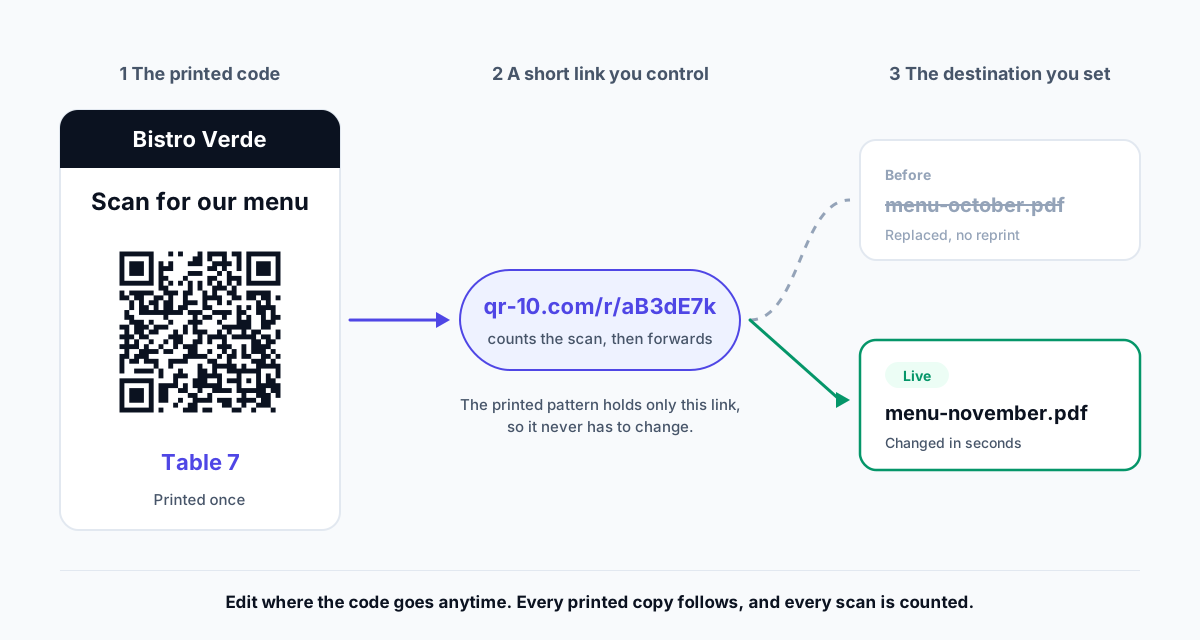
Static vs dynamic compared
| Static QR code | Dynamic QR code | |
|---|---|---|
| What it stores | The content itself | A short link to the content |
| Change it after printing | No | Yes, anytime |
| Scan tracking | No | Yes: when, where, which devices |
| Pause or turn off | No | Yes |
| Works without internet | Yes, for text, Wi-Fi and contacts | Needs a connection to open |
| Size and density | Grows with the content | Always simple (short link) |
| Depends on a provider | No | Yes, choose one whose codes don’t expire |
| Cost on QR-10 | Free, unlimited, no sign-up | 3 free; unlimited on Pro ($5/month) |
When a static code is the right choice
- Wi-Fi. Phones join the network directly from a WiFi QR code, with no website in between.
- Offline information. Text codes for labels, instructions and serial numbers work in basements and fields.
- One-off codes you will never change, such as a code in a slide deck or a personal note.
- Payment codes with a fixed UPI ID, which apps read directly from the code.
Static codes don’t depend on anyone: once printed, they work as long as the content is valid. The free QR code generator makes them with no sign-up.
When you need a dynamic code
Anything printed in quantity
Menus, packaging, brochures, signs and business cards are expensive to reprint. If a link breaks, a price changes or a page moves, a dynamic code is fixed in seconds. Our guide on changing a QR code after printing shows how.
Anything you want to measure
Only dynamic codes can count scans, because only they pass through a link that records them. If you want to know which flyer, table or poster works, you need to track QR code scans with a dynamic code per placement.
Long or changing content
Long web addresses make dense codes that need more space. A dynamic code stays small and simple, whatever the destination. Hosted pages, such as a mobile menu, a PDF or a link-in-bio page, also need a dynamic code.
Start with dynamic if in doubt
How to tell which one you have
- 1Scan the code and look at the link your phone shows before opening it.
- 2If it shows your own website or content directly, it is static.
- 3If it shows a short link on a QR provider’s domain (for example qr-10.com/r/…), it is dynamic, and that provider controls where it goes.
Our online QR code scanner shows exactly what a code contains, from a photo or screenshot.
Switching from static to dynamic
A printed static code can’t be converted, but you have options:
- If it links to your own website, redirect that page on your site to the new destination. The static code keeps working.
- Otherwise, create a dynamic code and replace the printed one at the next print run, or cover it with a sticker.
Check how long dynamic codes last